Happy April! CTM
Robin here with another Step-by-Step layout featuring one of Liz’s
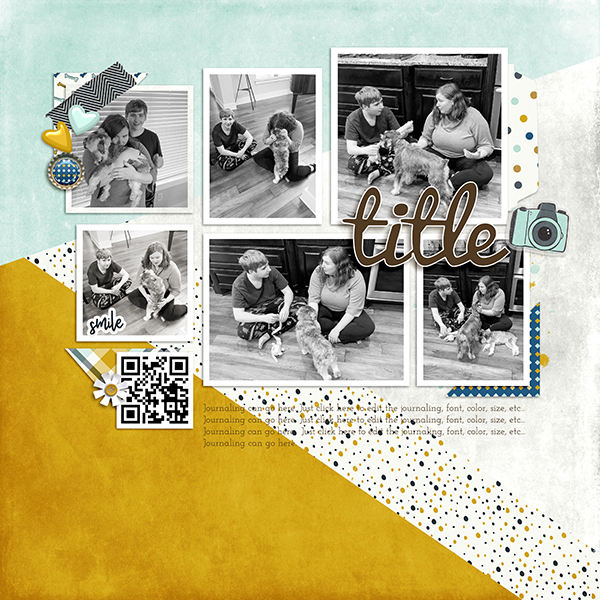
templates. This month I picked the Lots of Blocks template pack since I’m a sucker for templates with lots of photo
spots!
Like all the other templates in Liz’s store, this one was
super fun to use. First, I clipped my black
and white photos in the photo spots.
Next, I created a QR code of my daughter walking in the door
after a semester at school. I wanted to
preserve the memory of how crazy the dogs were to see her after being gone so
long.
Then, I added some fun elements found in Just Jaime’s Dogs
kit. I loved that the template didn’t call for that many elements and still
looks full.
Once all these items were in place, I played around with the
various papers and clipped them to the template. I also decided that I need a background which
drew the eye to the grid of photos, so I used my polygonal lasso tool to create
different shapes and clipped papers to them.
It was super easy to do and allowed me to make my own background paper.
Finally, I added my title and journaling. Liz used the font Pacifico for the title,
which I didn’t have, but I did find it for free! That’s it!
My page is done in no time at all.
Don’t you just love that Liz’s templates are so easy and efficient to
use?
Don’t forget that each month when I highlight a template,
Liz gives all her blog readers a coupon for 50% off that featured
template. How cool is that???? So, this month use coupon code SWL_LotsofBlocks
before it expires on May 13th. You will
love adding Lots of Blocks to your stash I promise!
See you next month!