/ Scrapping with Liz

Adjusting Masks Tutorial


Happy October!  Since it’s a new month, I thought we could have a new tutorial.  This time I’d like to show you how to adjust the masks in Liz’s templates using the “Group Layers” function in PSCC.  You won’t believe how easy and fun it is to manipulate masks so they are perfect for YOUR photos!


Let’s start so I can show you what I mean.  First, I’m using Focal Point Templates 3.  I love the large photo mask and that there is room for some smaller photos too!  What’s the problem?  Well, I need to place my large photo to show off the bears – which means the photo won’t fill the mask all the way.  Look at the right side of the photo.  See what I mean?  The mask is peeking out from the photo.  That's bad!


 So how do I fix this?  Of course I could just create a mask with my background color of white and then non-destructively mask away some of the mask (say that ten times fast!!).  To do this, select the mask layer, go to Layer>Layer Mask>Reveal All.  This should link the white mask with Liz’s mask.  Next select your soft round brush and with a black brush, and click where you’d like to remove the mask.  Now, when you clip your photo to the mask, your photo should fill it entirely.  If it doesn’t, simply select the mask and brush away some more.  This is what my screenshot looks like after I did just that.  Look at the layers panel!


Easy peasy, right?  Yes!  BUT, if you notice, I don’t have those pretty edges along the right side that I like so much about this template.  What to do???  This is where the fun comes in using groups.  You have a couple of options, and I’d like to show you two of my favorites techniques.  First, you can use any element or paint or stamp from your chosen kit and add that to a layer right above Liz’s mask.  Next, you select both the paint and the mask layers, right click, and select “Group from Layers”.  Once you have done that, you can clip your photo to the entire folder like I’ve done below:


Do you see the paint on top of the mask, yet grouped with it too?  And also that my photo is clipped onto the group?  The beauty of this method is that it’s completely non-destructive AND you can manipulate the items in the folder any way you want.  I grabbed the paint and moved it around until I got the edge on the right side just the way I wanted to.  You can keep adding other elements or masks or paints or anything else to the folder and the photo will still be clipped to the contents.  Try it!  You’ll love it 😊


Okay, I told you I’d show you TWO different ways so let me tell you another thing I love to do.  I love the edges in this particular template’s mask.  So, I simply used my rectangular lasso tool to select a portion of the mask that I wanted and then hit Control+J to put that selection on a separate layer above my mask.  I manipulated that selection and placed it where I wanted it to be.  Once again, I grouped both the new mask and the old mask and clipped my photo to both.  See what I mean?


Like I said before, I can now manipulate both masks (or even brush away more of Liz’s mask) and the photo will remained clipped.  Pretty cool, huh?!  And here’s my finished layout.  

made using Storyteller 2019 September kit and September's Stacked Mess, both by Just Jaimee

Now you don’t have to shy away from using templates with masks.  They can be altered to fit your needs and it’s fun doing so!

Week 39 and New Home Pages

Simple and Sweet Life Templates 10 by Scrapping with Liz
La Dolce Vita by Sabrina's Creations
Blissful Patterns and Backgrounds by Allison Pennington
Blissful Elements by Allison Pennington
Week 39 is done and I had time to finish up some house pages. Remember the house album I was working? You know, the house we've been in for 4 years? Yup, still working on that album. I'm actually really close to finishing it though. Just a few more pages to go. Maybe I'll have it done before the year is over.

Anyway, this week was filled with some big school progress, learning new chores, making muffins (and really all kinds of food), a college visit, and lots of outdoor play and walks. Whenever I make my pages at the end of the week I always am reminded at house blessed I am.  A beautiful family, a beautiful place to live, and time to enjoy it all and soak it up.

Simple and Sweet Life Templates 10 by Scrapping with Liz
La Dolce Vita by Sabrina's Creations
Blissful Patterns and Backgrounds by Allison Pennington
Blissful Elements by Allison Pennington
Must Watch Templates 2 by Scrapping with Liz
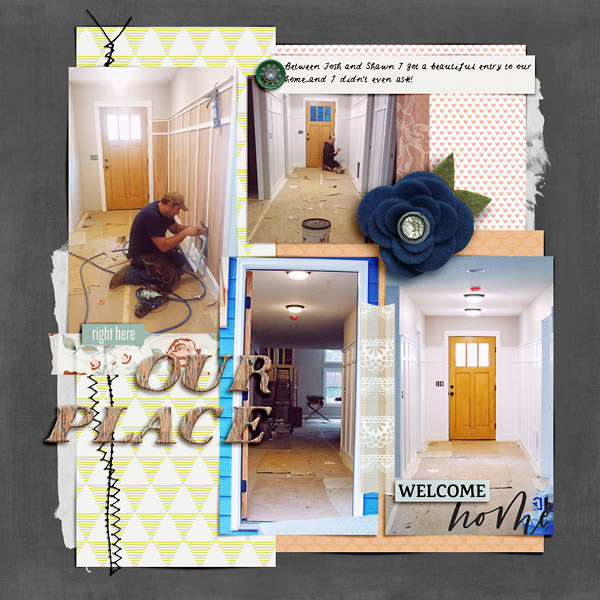
Here are my house pages. It's fun to look back and be reminded of what it looked like as we were finishing it up before we moved in.

Simple and Sweet Album Templates 7 by Scrapping with Liz
Shiplap Style Paper Pack by Forever Joy Designs
Shiplap Kit by Forever Joy Designs
We are Moving by Pink Reptile Designs and Paula Kesselring
Home Is Mini Kit by Soco Designs
These Walls by One Little Bird Designs
Happy At Home Stamps by Sahin Designs
Love Lives Here by Pink Reptile Designs
 Still love my entryway.

Simple and Sweet Album Templates 7 by Scrapping with Liz
Shiplap Style Paper Pack by Forever Joy Designs
Shiplap Kit by Forever Joy Designs
We are Moving by Pink Reptile Designs and Paula Kesselring
Home Is Mini Kit by Soco Designs
These Walls by One Little Bird Designs
Happy At Home Stamps by Sahin Designs
Love Lives Here by Pink Reptile Designs
Honey I'm Home Elements by Lynn Grieveson
Hoping to be back next week to show you some more pages!
-Liz

DSD - All About Me FREEBIE Download

Thanks for visiting my blog during TLP's all about: me freebie hop. 


You can download my contribution HERE.

Then, continue on to the next stop at Sabrina's Creations blog.

Remember, the freebies for Part 1 are only available through October 2nd at 11:59 pm EDT. Look for All About: You and All About: Us in the shop as Free with Purchase kits during our Digital Scrapbooking Day celebrations, from October 3-7.

Be on the lookout for lots of new templates and some super awesome deals!


And this is what you'll get when you follow the blog hop! Not including templates. It's a sweet deal.


Week 38: Friends, Airshow, Shopping and More!

Daily Life Scrapbook Page by Liz
Simple and Sweet Life Templates 10 by Scrapping with Liz
La Dolce Vita by Sabrina's Creations
Blissful Patterns and Backgrounds by Allison Pennington
Blissful Elements by Allison Pennington
Must Watch Templates 2 by Scrapping with Liz
I am so excited that I'm finally caught up with this album, and I still have time on this Sunday night to scrap more! What should I scrap? That is the question. I might scrap a page just for fun, I might check out a challenge in the TLP forum, I might work on my house album... I love having options.

This past week we had lots of friends over for lunch, played outside and started building a fort in the woods, the boys went to an airshow while the girls went shopping and then we ended it by going to the Pregnancy Care Center Banquet that we go to every year...and of course, we did some school work. It was a good week.

Daily Life Scrapbook Page by Liz
Simple and Sweet Life Templates 10 by Scrapping with Liz
La Dolce Vita by Sabrina's Creations
Blissful Patterns and Backgrounds by Allison Pennington
Blissful Elements by Allison Pennington
-Liz

Week 36 & 37 - I'm caught up!

Simple and Sweet Life Templates 9 by Scrapping with Liz
La Dolce Vita by Sabrina's Creations
Blissful Patterns and Backgrounds by Allison Pennington
Blissful Elements by Allison Pennington
It feels so good to be caught up on my weekly pages! I know how meaningful these albums are to my kids and it kept me going.

You'll see some more current stuff that's been happening these past two weeks...instead of seeing what has happened a month before.

We are getting into the swing of school and all the fall activities.
Simple and Sweet Life Templates 9 by Scrapping with Liz
La Dolce Vita by Sabrina's Creations
Blissful Patterns and Backgrounds by Allison Pennington
Blissful Elements by Allison Pennington

Must Watch Templates 1 by Scrapping with Liz
We had quite the week at the fair. A few ribbons won and we have a Grand Champion Rabbit...and one extremely happy girl.

Simple and Sweet Life Templates 10 by Scrapping with Liz
La Dolce Vita by Sabrina's Creations
Blissful Patterns and Backgrounds by Allison Pennington
Blissful Elements by Allison Pennington
We also had a 2nd place finisher in a local 5k. Not to mention celebrating someone's 17th birthday! How does time go by so quickly?

Simple and Sweet Life Templates 10 by Scrapping with Liz
La Dolce Vita by Sabrina's Creations
Blissful Patterns and Backgrounds by Allison Pennington
Blissful Elements by Allison PenningtonMust Watch Templates 2 by Scrapping with Liz
Run Cut Outs by Scrapping with Liz
That's it for this week. Hopefully, I'll be back next week and not get behind again!
-Liz
© Scrapping with Liz
Maira Gall