My 2016 Album Review


A few days ago I posted this photo on instagram. You can even see my happy dance if you follow me. I was so excited to be putting together my 2016 album! 


Today I have a little review and a few more photos for you. You might remember that I made this same type of album last year. The main reason I chose a 3 ring binder type approach with page protectors is for the durability of it. I have 7 kids. That's a lot of little hands and fingers flipping through our scrapbooks. I find this to be the best way to keep my pages safe and clean. My little 2 and 3 year old can flip through these pages without me having to worry about them accidentally tearing a page. It's also easy to wipe of the pages or replace a page if I need to. I've made several other types of albums (Shutterfly, Blurb, Various Layflat Albums, and More). I've really been happy with them, but for our big yearly albums this one works the best for my family right now.

I waited for a sale to order my 12x12 page prints from Persnickety Prints.  They always seem to have a sale on Super Bowl Weekend. They had a prepaid package deal where you could get 50 prints for $75. That's $1.50 a page. Which is really a great deal for a 12x12 print. I ordered my 12x12 We R Memory Keepers Classic 3 Ring Binder in Navy and 12x12 page protectors from Scrapbook.com. Then I just waited for it all be delivered. It took less than a week to get both my prints and my album. Then I just had to put it all together.


The image above is before the pages were placed in the page protectors. You all know I love Persnickety Prints. I've never had an issue with any of their prints before. Their colors are true and vibrant, I never have to worry about the edges of my pages being cut off, and I've never had an issue with orders or customer service.


How thick 105 pages look in a 3 ring binder. The only issue I have with these books is how much space they take up on a bookshelf.


The 3 ring binders make for easy turning and I could easily add in a few more page if I needed to.


And just some pics of the inside of my book.


I love how big all the photos look on 12x12 pages. The journaling size is just right too.


He's a HUGE fan of my scrapbooks. He wants to look at them every day. He likes to point and show me everything as if I haven't seen it before. :)


This is why I scrapbook, and this is why I print my pages.


-Liz

P.S. If you would like to take a look at my whole album you can check it out here on Flickr.

Week 7: Party, Piano, School, Sickness...

My Life Templates 2 - 2017 by Scrapping with Liz
Counting the Weeks Volume 1 by Amber Labau
Using February BYOC Products:
All Things Considered Papers by One Little Bird
All Things Considered Elements by One Little Bird
Puppy Love Papers by Pink Reptile Designs
Love is All Around Papers by Lynn Grieveson
Loves is All Around Elements by Lynn Grieveson
I'm just going to share the journaling from my pages this week. It sums up our week anyway. No need to rewrite it here on the blog.

Left Page:

This week we had visitors for a little Valentine's Party. We made pizzas and decorated Valentine's cards. It was so much fun hanging out with the Allen Family.
Ashlyn also started teaching Matthew & Lydia piano. It sure is something to see your oldest daughter teaching her younger siblings.


Right Page:

 On Wednesday we always do map work. The kids are getting quite good at drawing Europe and knowing where all the different countries are. It's one subject they can't wait to do!  On Friday Matthew and Lydia received their very own Bibles. It's tradition that when they can read well they get their own Bibles. They were so proud...so was momma! On Saturday Shawn took Emmie, Kyla and Lydia to the Father Daughter dance at our local private school. They had so much fun. Abi was sick and Ashlyn had gone to a piano clinic with her teacher and a few other students.

How are you doing scrapping 2017?
-Liz

Insta Review Album Inspiration by Katya


Katya created this Album with my Insta Review Templates. I think it's such a great, easy way to make an album to review the year. It's simple, it has a lot of photos, and gives a great idea of what the year looked like. You can't go wrong. 


She used http://www.fotokniga.by/ to print her album. It's 20x20cm on photopaper.


Check out these close ups. I love the shadows. It gives is a real paper look.


And here are all of the pages.


I may need to do this!
-Liz

My Faves - Templates 1 and 2

Liz has some fun new digital scrapbook collections in The Lilypad store. These aren't completely new. They are retired designs that Liz herself has used and are among her favorites. She has freshened them up a bit, reflective of the styles of today. Both sets have lots of variety, with small photos, large photos, just a bit of journaling, or large text blocks. These are on sale, 20% off, through February 19, 2017.


Erin Scrapped this lovely page with My Faves - Templates 1.

Rebecca scrapped this lovely little baby girl page with My Faves - Templates 1.

Christine scrapped some fun playground photo with My Faves - Templates 1.

Rebecca scrapped her four kiddos with My Faves - Templates 2.

Ellen scrapped this fun page with My Faves - Templates 2.

Grab these classic templates now on sale!

Week 6 included our own halftime show....

My Life Templates 2 - 2017 by Scrapping with Liz
Counting the Weeks Volume 1 by Amber LabauDecorative Stitches by Valorie Wibbens
Using February BYOC Products:
All Things Considered Papers by One Little Bird
All Things Considered Elements by One Little Bird
Puppy Love Papers by Pink Reptile Designs
Love is All Around Papers by Lynn Grieveson
Loves is All Around Elements by Lynn Grieveson

Week 6 is gone and done. We had a pretty simple, low key week. It started with our own little Super Bowl Party. With 9 people in our family we can have a party whenever we want to and not have to invite anyone over! We usually do have a party but it sort of slipped past me this year (still getting used to this 7 kid thing!). The kids put on their own halftime show for us. It was pretty cute (check out the video below). It's been really warm here for February so we've enjoyed a lot of walks and playtime outside.


We had our normal school days along with piano, co-op and Library. It really was a nice, simple week. Always filled with lots of memories.


Best halftime show ever!


Hope you week 6 was as fabulous as mine.
-Liz

Custom Text Technique for Photoshop Elements

Hi! It's Tiff here. Last year I got a new computer, and I was sad to realize that my trusty old copy of Photoshop CS4 would not work anymore. I needed to "upgrade" Photoshop CC or "downgrade" to Photoshop Elements. I chose Photoshop Elements.

It has been difficult adjusting to a limited range of features. One I miss the most is the Pen Tool. I used it a lot for text boxes when I wanted to fill text all through the irregular areas in my page. But I recently discovered a work-around in PSE 15.

Here is my tip in a nutshell: You can use the Custom Shape Tool to place and overlap multiple shapes. Then you can merge them all together into one complicated shape! When you switch over to the Horizontal Type Tool, you can fill the shape with your text.

Now I'll step you through with screenshots. I'm using Artsy Journal Templates 14, and instead of using the text box that came in the template, I'm making my own because I filled much of the original space with extra photos.

Here I have placed three green rectangle shapes, and I've angled them so that they match the shape of the pink vellum layer. I made them different shades so that you could see they are separate shapes.

I select all three layers at once, and I right-click with my mouse to Merge Shapes.

Here is the result: the three simple shapes have become one complicated shape:

If you wanted your text to be exactly horizontal, you would switch to the Horizontal Type Tool now, and click inside your shape and start typing. When you move your mouse into the middle, the cursor will turn to an I-beam with circle.

I wanted my text to be tilted, so I took an extra step. I rotated the shape so that the edge along the title word "Art" was horizontal. I paid attention to the exact angle of rotation, so that I could exactly rotate it back later.

Now, I switched to the Horizontal Type Tool, clicked inside the shape, and I typed my text. In the inset, you can see that the Shape and the Type layers are separate. You can hide or delete the Shape layer after you have the Type layer established.

Unfortunately, I didn't take any more screen shots after this, but all you have to do at this point is rotate your text box backward by the same number, and you've got a custom shape, angled text box.  Here is my finished page. I used kits from the October 2015 BYOC at The Lilypad.

If you are an Elements user and have been looking for some techniques to take your journaling to the next step, I hope this gives you something that is simple with big impact. It would probably be cumbersome if you had an extremely irregular shape you wanted to build. But if your text space can be build up with just a few different shapes, then this might be a good technique to have up your sleeve. Have fun journaling!

Week 5: Spelling Bee, IE, Friends & Calendar Page

My Life Templates 2 - 2017 by Scrapping with Liz
Counting the Weeks Volume 1 by Amber Labau
Using February BYOC Products:
All Things Considered Papers by One Little Bird
All Things Considered Elements by One Little Bird
Puppy Love Papers by Pink Reptile Designs
Love is All Around Papers by Lynn Grieveson
Loves is All Around Elements by Lynn Grieveson
New Chapter Pocket Cards by Sabrina's Creations
Week 5 included our annual spelling bee, my oldest daughter's Individual Event, time with friends, time at home, school, etc... I took so many videos this week that I had 4 QR codes, and that didn't even include all the videos. I usually try to combine little clips, but there were so many different events that they didn't seem to fit together.


Can I say that I was super proud of my kids this week for getting up on stage (and my littles for sitting still!). My oldest with her 3 minute memorized speech, and four others for participating in our local spelling bee. I was especially proud of Matthew. Since he's only been hearing for two years he has to work extra hard at reading, spelling and writing. Plus speaking in public is something he is apprehensive about (understandably), but he got up there, he spelled words clearly and correctly, and made it through several rounds.


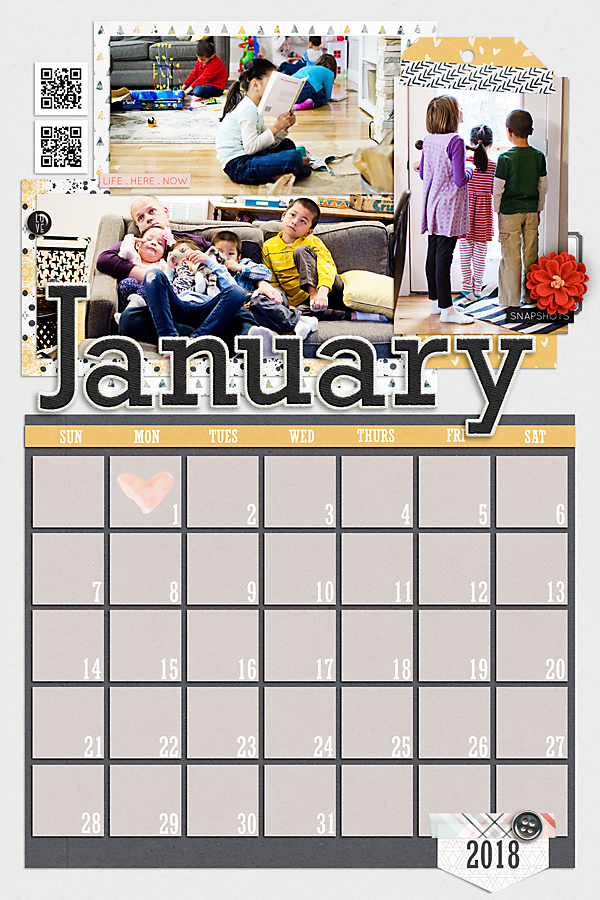
I loved the 12x18 Calendar that I created for my mom for 2016 that I'm doing it again for 2018. Just like the last couple of years I'll release a set of calendar templates so that you can make your calendar pages throughout the year and be all ready to print come December. I've already got January's in the store and February's will be there soon.

Here's my January page.

2018 January Templates by Scrapping with Liz
January 2017 BYOC Products available at The Lilypad

Month of Challenges - I finished!

The Month of Challenges is over at The Lilypad, but I wanted to share my completed pages anyway! Maybe some of the pages will give you inspiration to scrap, maybe you'll be encouraged to participate next year...maybe I just wanted to brag that I finished! :)

I'll share a little bit about each challenge and the page I created. Click on the image to get full credits.


Day 21 was a song lyric challenge. I chose Brave by Moriah Peters. Here's the journaling on my page: Brave by Moriah Peters spoke to me and encouraged me during the whole adoption process and even still. The paperwork, waiting and raising adopted kids with special needs requires a lot of courage and boldness. I don't have any of that without Christ. I constantly need reminding to keep looking to Him.


Day 22 was a filled up style challenge. You had to fill your page at least half full with brushes, elements, papers, etc... and use at least 5 photos. I love the filled up pages!


Day 23 was an If these walls could talk page. You had to scrap with journaling that was from the perspective of the walls. I chose these photos, and I journaled about how Kyla was such an amazing big sister those first few days.


Day 24 was a Cluster Challenge. There was a free cluster from Bella Gypsy that we needed to use on our page and then we were supposed to practice our clustering...which is something I need help with. I loved the cluster and the challenge.


Day 25 was an Artistic Sketch Challenge. I loved this challenge because I learned a new technique. Here's the tutorial if you want to try it yourself. I can see myself doing this again.


Day 26 was a Pocket Page type inspired challenge. We were supposed to use at least 4 photos and 2 journal cards. This was pretty easy, and I actually combined it with a right page to make a double page spread.

Here's the right page.


And the full page.


Day 27 was  Combine Two Templates Challenge. It included a template from me and Just Jamie. It was really fun combining them to see how they could work together.


Day 28 was a paper inspired challenge. We were supposed to pick a paper page as inspiration and then scrap it digitally. I chose this paper layout. It was really fun trying to use the paper page as inspiration. It gave me some new ideas, and it helped with my clustering.


Day 29 was  Photoless style challenge. This was easy since I needed to make a cover page for my China album. I love how it turned out.

Day 30 was an Art Journaling Challenge. Definitely a difficult one for me. You had to use one of the masks provided and leave it where the background was white. I honestly didn't know what to do and just put together something I might use in my House Album.
Day 31 was a Map from Here to There Challenge. You had to use a map on your page, at least 3 photos, mark at least 3 spots on the map and write at least 3 lines of journaling. This was a fun page to make.


Those last few days of the challenge I didn't think I was going to make it. I fell behind by about 5 pages. Since I was so close I didn't want to quit. I thought I would at least finish each challenge even if I didn't complete the pages on time. I ended up getting them done on time though! What an accomplishment.

I hope you'll join me next year!
-Liz
© Scrapping with Liz
Maira Gall