Template Inspiration
Showing posts with label Template Inspiration. Show all posts

Scrap with Me!

I created another page for my daughter's album, and just for fun, I recorded myself scrapbooking it. You can watch the video below! If there are any tutorials or specific videos you'd like to see, let me know—I'm having so much fun making them!

Layers upon Layers Templates by Scrapping with Liz
Hello Baby by Elif Sahin Designs


Another Step-by-Step Layout

Happy Thanksgiving!  CTM Robin here and since I’m in the Staes, I am spending the day being thankful for what I’ve been blessed with.  One thing I’m thankful for is my family.  My youngest is home for Thanksgiving break and I’ve just enjoyed spending as much time with him as possible.  We’ve been talking about things we used to do together, so I wanted to spend some time documenting one such adventure – the day we were inducted into the Order of the Arrow.  I decided to use Liz’s Artsy JournalTemplates 42 to scrap my page:

And chose this one because of the number of photos spots and the opportunity to fill up the page with journaling:

I’ll walk you through my thought process.  First, I added my two photos:

Next, I knew I wanted lots of bright and fun items on the page, so I deleted the text box and added a ton of elements from Lynn-Marie’s GoodTimes bundle:

After this, I added my background paper and clipped some papers to those fabulous corner spots:

Finally, I told the story of our weekend which was one of the ones my son and I discussed.  We’ve been blessed to do a lot of Boy Scouts together, and I love that he likes to tell the stories and look at past pictures just as much as I do!

Well, that’s it for me. I’m going to hang out with my kid for a few more days before he heads back to college again.  Thanks for checking out my layout and the steps I took to create it!

Step-by-Step Layout

Hello and happy Thursday!  CTM Robin here with another Step-by-Step blog post.  Today I thought I’d show you a layout I made using one of Liz’s latest releases, Focal Point Templates 11.  I have used each and every one of her Focal Point templates and was super excited to see more added.  They are perfect templates when you need to scrap a large photo along with some smaller, detailed ones.  


For my layout, I chose this template:


I rotated and resized some photo spots and then clipped my photos into them:


Next, I added my papers from Adventure collection by Anita Designs, Rachel Etrog Designs, and Dunia Designs:

Followed by the elements and titles:

Finally, I placed journaling, and my layout was done!

Thanks so much for looking at how I created this page. I hope you love these templates and find them as easy to use as I do!

Another Step-by-Step Layout

Welcome to another Step-by-Step blog post.  CTM Robin here to show you how I scrapped a layout about my son’s journey to completing his Cycling Merit Badge.  Today I used Liz’s Memories Template 2 because I knew it was perfect for the two photos I had.  

Here’s the template I’m using today:

First, I placed my photos:

Next, I clipped all my papers from the This is Now collection by Rachel Jefferies.  The colors were perfect, and the layered mixed media background paper coordinated with all the layered shapes in this template:

After my papers were in place, I added elements from the same collection being mindful to have strong colors and shapes repeating an odd number of times throughout the layout.  This way the page is balanced and keeps your eyes moving.

Finally it was time to focus on my storytelling and my title.  I love that Liz incorporates shaped text boxes into her templates which saves me a lot of work.  I added my text into this text box and was able to resize it while maintaining the structure.  Not every template has this so I’m always thankful when I find a designer who takes this extra step!

Well, that’s it for me today.  Do you see how quickly you can scrap a page with Liz’s templates??  I hope you find this set as much fun as I did!

Step-by-Step Layout

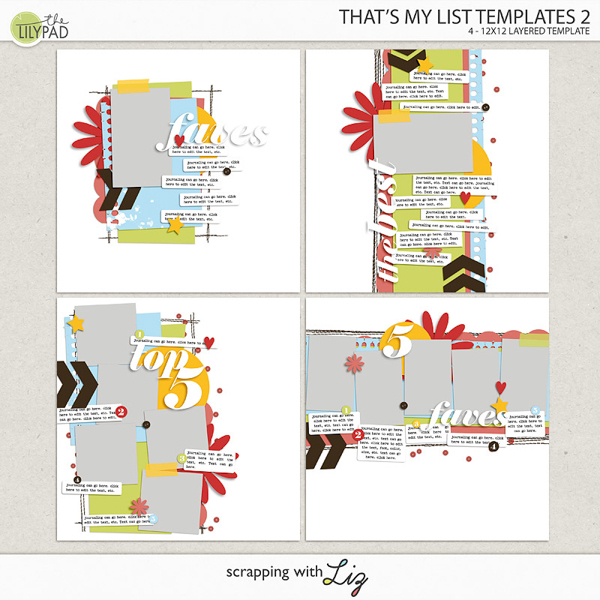
Happy August y’all!  CTM Robin here with another Step-by-Step blog post.  I’ve been blessed enough to play with my grandson this summer while taking loads of pictures!  Now that I’m home from visiting, I wanted to scrap his photos since I miss him terribly already.  With this in mind, I went looking for a single photo template that had lots of room for papers so I could match the colors in his funny dinosaur robe.  I think I found the perfect one in the That’s My List Templates 2 pack:


The first step is the best one in my opinion – putting his photo in the photo spot!

Next, I clipped some colorful papers from Hey There, Handsome by Bella Gypsy’s Design:

They were fun to use, and I love that I could use so many in the different layers on this template.  After the papers, I added a bunch of word strips and other elements to fill up the template:

Finally, I journaled about my love for him and his love for his robe 😊

Well, that’s another layout done quickly thanks to Liz’s template.  I hope you like my page and thanks for joining me on this process!

Step-by-Step Layout

Happy July y’all!  Can you believe the year is almost halfway over??  I’m not ready for summer to end here in the States so I’m crossing my fingers that time slows down!

Well, with a new month here, it means I have a new Step-by-Step blog post to share.  Today I wanted to show you how I made a layout using Liz’s Circular Templates.

I love it when she includes the journal boxes in shapes so I don’t have to!  This template is super cute, don’t you think?!

As usual, I started by clipping my photos to the photo spots.  I love this big half circle which allows me to use a large vertical photo on my page without a boring rectangular shape:

Next, I clipped some papers from Lynn Grieveson and Studio Basic’s Don’t Quit collection to the background and the text boxes.  These papers had the perfect neutral shade I needed to show off the fountain.

Then I added elements from Lynn Grieveson’s Before and After collection.  One of the reasons I reach for Liz’s templates over and over is because she has space for some elements, but not so much that my photos take a back seat!

Finally, I used the big title that was there and typed in my words “Fiumi Fountain” and then applied a metal outline style to it for a whimsical effect.  I also added my text and suddenly I was finished!

See how fast and easy it is to scrap a page using Liz’s templates?

Well, that’s it for me.  I hope you like my page and I appreciate you taking the time to see how it was done.  See y’all next month 😊 

Another Step-by-Step Post

Happy June y’all!  CTM Robin here with another Step-by-Step post.  Summer is here in the US and I just want to be outside with my kids.  That means I need to scrap quickly which is why I love using Liz’s templates – she does all the hard work for me, and I can a page done in 20 minutes or so.  This month I wanted to use a template from her Recyclables 81 pack.  I picked this one because of the number of photo spots:


I filled those spots and ended up rotating one and adding another.  That’s an additional reason I love Liz’s templates – you can add and take away photo spots without messing up the overall look!  See what I mean?

Next, I added my papers from Sea Spray by Rachel Jefferies:

Once I was happy with my papers, I added elements making sure I spread the beads throughout the page and repeated my colors in a triangular form so that the layout has “movement”:

Lastly, I added my journaling and then used a metal style to add a metal effect to my title.

That’s it.  I’m done and out the door 😊  See y’all next month.  I hope you like my layout and get some time to enjoy your June!

It's Step-by-Step Time

Happy May y’all!  CTM Robin here with another Step-by-Step blog post.  This month I thought I’d show you how I used a template from my favorite series, Artsy Journal Templates.  I chose the single photo template one from set 40:

 
Don’t you just love the fun shapes and gorgeous brushwork marks on this one?  After making my choice, I put my photo in there and then let the creative process begin!

I knew I loved the colors and mixed media feel in Rachel Jefferie’s and Lynn Grieveson’s Tempus kit, so I pulled some papers from that for my background and those bold shapes.

 
Next I added some elements and word strips.  I did tweak the shadows under my word strips to give it an illusion of being lifted on one side.

 
Finally, I added my title and journaling.  I love that Liz’s titles are editable so all I have to do is type my word in, rasterize the type, and then fill it with my paper choice.  It’s super easy to get a pretty title!

Y’all this layout was crazy quick to make thanks to Liz’s template.  It really was a “plug and play” kind of scrapping which gives me time to finish up all these end of the school year obligations.

I hope you enjoyed seeing how my page came together and will come back next month for another Step-by-Step post!


Another Step-by-Step Post

Happy April!!  Another month means another Step-by-Step blog post.  CTM Robin here and I’m excited to share my latest layout using Liz’s Artsy Journal Templates 38 set:

I chose to use this particular template because I needed 4 vertical photo spots:

As usual, I added my photos first.

Next, I added my papers from Lynn Grieveson’s Finding Balance collection.  The colors were perfect, but more importantly, this whole layout is about my son finding time to relax with a book – even amidst the chaos of his schedule!

After the papers, I added some elements.  I love that Liz’s templates give me an idea of where to place elements, but also allow me the freedom to replace paper spots with flowers or take away placeholders too.  These templates are a great jumping off point!

Finally, I only needed to add my title work and my journaling.  These Artsy Journal templates are amazing for giving me space to tell my story.  I truly think that journaling is the most important part of my layouts (well, besides the photos of course!).  One day I won’t be here, and I’d like my kids to know all of the details and remember our stories!

Well, that’s it for me.  Another layout done and ready for my album.  I hope you enjoyed this post and I appreciate you taking the time to check out my thought process and resulting page.  See you next month.

Another Step-by-Step Post

Happy March!  This year is already flying by, and I can’t believe it’s time for Spring Break here in the States.  As usual, we have a full spring schedule with school and activities so when I want to scrap a page quickly, I reach for Liz’s templates.  I thought I’d show you my process in this month’s Step-by-Step blog post.  Since I knew I wanted to scrap our visit to the coffee bean farm in Hawaii, I chose a template with a large photo mask – one from Focal Point Templates 10:

This series is perfect for landscape or travel photos, and I love them all!  However, I was drawn to this particular one because of the horizontal mask:

I always start with my photos since that’s the most important part to me:

Next, I decided to choose my background paper.  With the large mask, I knew I wanted a paper that wouldn’t compete with the photo, but still add some visual interest so I chose this one found in T is for Together by Rachel Jefferies and Studio Basic:

After those steps, it’s just fun playing around with different elements.  I love that these templates allow me to use just a few elements and yet make an aesthetically pleasing page:

Finally, I added my title and journaling (the second most important part for me so I wanted it to be legible when printed).  I used white on the word “coffee” and then lowered the fill to 25% and added a white stroke.  This allowed an almost transparent look, but still readable!

And that’s it!  Another page done and ready to print.  See how fast these go when you use the right template as a jumping off point?  I hope you like it and appreciate you reading through my steps. See you next month 😊

© Scrapping with Liz
Maira Gall